Reference manual
Architectural overview
Synopsis
The core functionality of the IDEAL software is to compute the dose distribution for any PBS ion beam treatment plan, using Geant4/GATE as the dose engine. The primary purpose is to provide an independent dose calculation tool that may be useful in clinics, but the software is designed to be useful also for a variety of research topics related to dose calculations.
Since Geant4/GATE simulations are quite CPU time consuming, IDEAL is designed to run on a GNU/Linux cluster in order to achieve the statistical goal within a reasonable time. IDEAL is implemented as a set of python modules and scripts. These convert the information in the input DICOM plan data into a set of data files that can be used by Gate to simulate the delivery of each of the beams requested in the treatment plan, using beamline model details and CT calibration curves that are configured by the user during installation and commissioning of IDEAL. The dose distribution for each beam is computed separately up to the statistical goal specified by the user: number of primaries, average uncertainty or a fixed calculation time. The dose is scored on the CT grid, and it is resampled at postprocessing on the grid used by the treatment planning system. The user can choose a different spatial resolution by overriding the number of voxels per dimension. Each of the beam dose distributions as well as the plan dose distribution are exported as DICOM files. On top of dose distributions, IDEAL can be configured to evaluate other quantities, such as RBE weighted dose and LETd.
In the following sections the key elements of this setup will be described in more details.
Device-oriented workflow
A device oriented example view of the workflow is illustrated in the figure below.
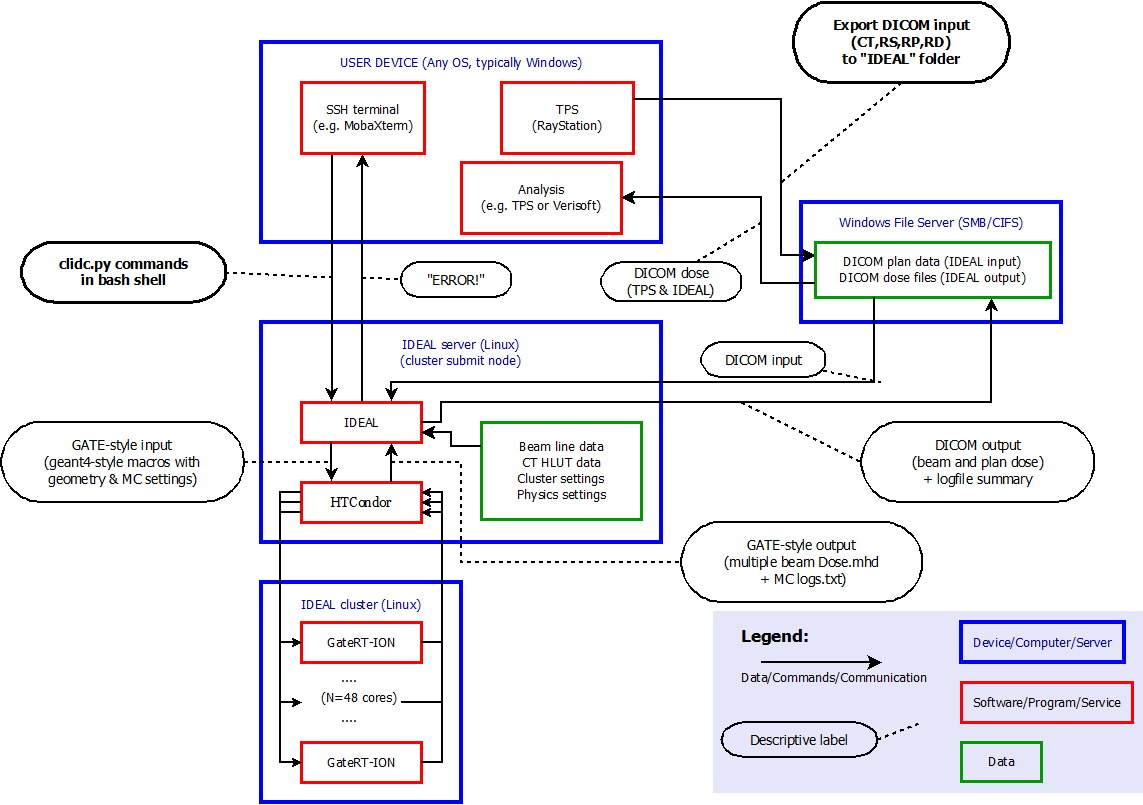
In this view, the user is logged in to the treatment planning workstation.
The user exports a treatment plan (or “beam set”) from the TPS to DICOM files on a shared file system. The exported data include the planning CT, the treatment plan (including the ion beam sequence), the structure set and physical and/or effective dose for the beams and/or the plan, in a folder that is also mounted on the submission node of the cluster.
The user logs in to the submission node of the cluster and runs one of the IDEAL user interface scripts (
clidc.py,api.pyor a custom python script likeexample_ideal_module.py) to start an independent dose calculation. The minimum input information is the treatment plan file and the statistical goal (number of primaries or average uncertainty). Optional overrides of the default settings are discussed in the following sections.IDEAL collects and checks all necessary DICOM data that are referred to by the treatment plan file: the structure set (including exactly one ROI of type “External”), the planning CT and the TPS dose.
IDEAL finds the beamline model(s) corresponding to the treatment machine(s) specified in the plan file.
IDEAL finds the conversion tables for the CT protocol of the planning CT.
A ‘work directory’ is set up with all scripts specific for the IDC of the treatment plan:
configuration file for Preprocessing (CT image cropping, material overrides)
configuration file for
GateRTionconfiguration file for Postprocessing (dose accumulation, resampling and export to DICOM)
submit file for HTCondor (cluster job management system) “DAGman” job
The IDC is started by submitting the condor “DAGman” job. The directed acyclical graph (DAG) has just three nodes:
preprocessing on the submit node
Gate simulation on the calculation nodes
postprocessing on the submit node
Additionally, the user can start a monitoring program, launching
log_daemon.py. The program can be configured as described in the dedicated commissioning section. The program keeps running in the background, and keeps track of all simulation started and of their status. The information is accessible in the IDEAL logging directory, inideal_history.cfg.
Preprocessing
The job-dependent details for the preprocessing are computed and saved to a text file by ideal.impl.idc_details.WritePreProcessingConfigFile().
The preprocessing is performed by the bin/preprocess_ct_image.py script as part of the HTCondor DAGman corresponding to the IDC job.
Create 3D image from 2D DICOM slices.
Cropping: the minimum bounding box is computed that encloses both the “padded” External ROI volume in the planning CT and the TPS dose distribution. The External ROI is padded with a fixed thickness of air on all six sides. The padding thickness can be configured with an entry for air box margin [mm] in the
[simulation]section of the system configuration file. This air-padding may help improving the correctness of skin dose calculation.Hounsfield unit values are truncated to the maximum HU value specified in the density curve given for the relevant CT protocol.
In all voxels whose central point is not within the External ROI volume, the material is overridden with air (
G4_AIR).Each override specified by the IDEAL user is applied to all voxels whose central point lies within the ROI to which the override applies. The user should not specify different material overrides for two or more overlapping ROIs, since the order in which the overrides will be applied is random.
The material overrides are implemented by extending a copy of the interpolated Schneider table corresponding to the relevant CT protocol. In the extension, HU values larger than the maximum HU value in the density curve tables are associated with the override materials, and in the preprocessed CT image those high HU values are used for the voxels that have material overrides.
A mass file is created with the same geometry as the cropped CT image, with floating point voxel values representing the density (in grams per cubic centimeter). For voxels with material overrides (e.g. outside the external), the density value is taken from the overriding material; for all other voxels the density is obtained by a simple linear interpolation in the density curve.
A dose mask file is created with the same geometry as the output dose files, with value 1 (0) for all voxels with the central point inside (outside) the External ROI.
Gate simulation
- Work Directory
- By convention, a Gate work directory has 3 subfolders named
data(containing CT and CT protocol data, beamline specific configuration files, treatment plan file, RBE tables), logs(with the files for each Gate job) andoutput(all output goes into this folder). As we wish to run many instances of the same Gate job on a cluster, the corresponding output directories are suffixed with the job number. Each Gate job will simulate all beams of the treatment plan, one after the other, and save the results in the same output folder.
- By convention, a Gate work directory has 3 subfolders named
- Patient Geometry
The geometry for the simulation is defined in such a way that the isocenter coincides with the origin in the Geant4 coordinate system. A
patientboxvolume is defined as the smallest rectangular box that is centered on the isocenter and contains the (cropped) patient CT image plus a small air margin. The material of theworldandpatient boxvolumes isG4_AIR. This patient box helps to perform the translation and the rotation of the (cropped) CT image in the correct order:The (cropped) CT is imported into Gate as
ImageVolumegeometry element defined by Gate as a daughter volume of thepatientbox.Using the iso center coordinates taken from the DICOM plan data, the CT image is translated with respect to the origin of the
patientbox.The couch rotation is performed on the patient box. The negative of the angle given in the DICOM plan file is used, to account for the difference in coordinate systems.
- Phantom Geometry
For commissioning purposes, it can be useful to run the simulation on a geometrically defined phantom instead of the CT image that was specified in the DICOM plan file. To this end, the user specifies the name of a phantom that was configured during commissioning. T he planned couch angle and the isocenter position have no effect on the positioning of the phantom.
- Hounsfield Units to Materials Conversion
IDEAL uses the recipe defined by [Schneider2000] to associate the Hounsfield Unit value of each CT voxel into a material with a suitable density and chemical composition. Gate provides a
HounsfieldUnit_to_materialfunction to interpolate a density curve (specified as a sparse table of (HU,density) data points) and a ‘material composition file’ (list of mass fractions of chemical elements for about a dozen subsequent ranges of HU values) into a HU to material look up table (LUT) and a material database. The HU to material LUT links each HU interval to a specific material, while the material properties in terms of density and fractional elemental composition are defined in the material database. To improve the resolution in density, the functions takes a density tolerance parameter.The CT protocol is deduced by applying the DICOM match criteria specified in the
hlut.confconfiguration file (as defined during commissioning) to (one of) the CT DICOM files. Each CT protocol is associated with a density curve and a Schneider style HU-to-composition table, which are used for the HU to material LUT definition. The density tolerance value can be specified in system config file. The interpolated materials database and the HU to material LUT are saved in thecachedfolder in the commissioning data directory, so that they can be reused. The two files are copied into thedatadirectory of the working directory, where they are accessible by the Gate simulations.
- Nozzle and passive elements
For each treatment machine (beam line), the commissioning physicist should have provided configuration files that describe the nozzle geometry and the available passive elements for that beamline. The configuration files for the beamline and ion species combination specified in the DICOM tretament plan are copied into the
datasubfolder. The nozzle and the passive elements are rotated according to the gantry angle defined in the DICOM plan for each beam.- Source
Gate simulates each beam in the plan individually. The DICOM RT plan information is processed by IDEAL and converted into a text file. This file, together with the beam model defined for the beamline and ion species combination specified in the DICOM tretament plan, are used in Gate to instanciates a
TreatmentPlanPBSource. The source orientation accounts for the gantry angle of each beam.- Physics Settings
The physics settings defined in system config file are used for the simulation.
- Dose actor
In Geant4/Gate, results are scored by modules that are named “actors” which are “attached” to Geant4 volumes. The dose scoring in IDEAL is handled by the so-called
DoseActor, which is attached to the (cropped) CT volume, using the same resolution as the CT. The “dose to water” is scored. The post-processing script resamples the dose from the CT geometry to the dose grid of the final output (typically the same as the TPS dose grid).- Other actors
If enabled in the system configuration file, the Gate simulations will also score additional outputs. The scoring resolution is established as for the Dose actor.
RBE actor: Gate 10 documentation
LET actor: Gate 10 documentation
Calculation of average uncertainty
The dose distributions of each beam in a beamset (or treatment plan) is
computed separately. When computing the dose for one beam, on (almost) all
physical cores of the cluster GateRTion is simulating protons or ions with
kinematics that are randomly sampled from all spots in the beam, with
probabilities proportional to the number of planned particles per spot, and
Gaussian spreads given by source properties file
for the beamline (treatment machine) by which the beam is planned to be
delivered.
For all particles that are tracked through the TPS dose volume
within the (cropped) CT geometry, the physical dose (in water, by convention)
is computed by the DoseActor in GateRTion as the deposited energy
divided by mass, multiplied by the stopping power ratio (water to material,
where the material is either the Schneider material corresponding to
the voxel Hounsfield value or override material, in case the user
specified an override for a ROI including the voxel).
Internally, Gate calculates voxelwise the event based statistical uncertainty of the scored energy deposition, using the equation below. In the equation, edep stands for the energy deposition accumulated in the voxel up to this point, while N is the number of simulated events. The uncertainty is calculated only on high energy deposition voxels, to focus on clinically relevant regions. Only voxel with energy deposition higher than a configurable threshold are used, as described in the system configuration file section. During the simulation, Gate compares the average uncertainty of these voxels to the target uncertainty set by the user. If the target has not been reached yet, Gate estimates the number of primaries that still need to be generated. The process is repeated until the average uncertainty is lower than the set goal.
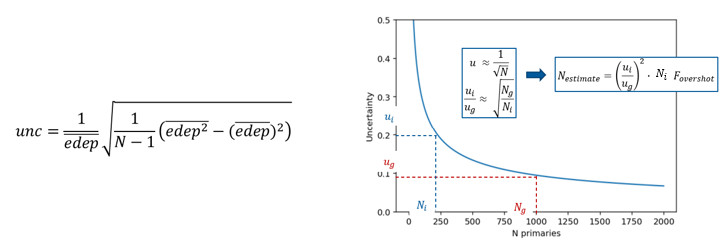
The simulations for each beam will not be stopped until the above described average uncertainty estimate for the beam dose is below the target value. In other engines or treatment planning systems, the average uncertainty goal may refer to to the plan dose instead.
Postprocessing
Actions in post processing:
Accumulate dose distributions and total number of primaries from simulations on all cluster cores.
Scale the dose with the ratio of the planned and simulated number of primary particles.
Scale the dose with an overall correction factor.
Resample the dose to the output dose geometry (typically the same as the TPS dose geometry)
For protons: compute a simple estimate of the “effective” dose by multiplying with 1.1.
For carbons: calculate RBE weighted dose, if requested.
Calculate other quantities configured by the user.
Save beam doses in the format(s) configured by the user.
Compute the gamma index value for every voxel in the beam dose with dose above threshold, if gamma index parameters are configured and the corresponding TPS beam dose is available. Output only in MHD format (no DICOM).
Compute plan doses (if plan dose output is configured by the user).
Compute gamma index distributions for plan doses (if TPS plan dose is available and gamma index calculation is enabled in the system configuration).
Update user log summary text file with settings and performance data.
Copy final output (beam and plan dose files, user log summary) to another shared folder (typically a CIFS mount of a folder on Windows file share, to be configured by the user in the system configuration file).
Clean up: compress (rather than delete: to allow analysis in case of trouble) the outputs from all
GateRTionsimulations, remove temporary copies. This is usually the most time consuming part of the post processing.
Developers’ manual
How to hack stuff.
TODO list
Make IDEAL/pyidc into a “pip” project.
Support rotating gantry.
Support range shifter on movable snout.
Some parameters can now be overridden by the command line interface
clidc.py, but not by the GUIsocrates.py, and vice versa. E.g. in thesocrates.py, a phantom geometry can be translated by changing the isocenter coordinates, but theclidc.pydoes not yet have an option for requesting such a change. The functionalities of the user interfaces should be as similar as possible.The job_executor and idc_details classes are too big, lots of implementation details should be delegated into separate classes. + Specifically, the creation of the Gate work directory and the creation of all condor-related files should be wrapped in separate classes. And then it should be more straightforward to support other cluster job management systems, such as SLURM and OpenPBS.
There are still many ways in which the user can provide wrong input and then get an error that is uninformative. For instance, using “G4_Water” instead of “G4_WATER” as override material for a ROI results in a KeyError that only says that the “key” is unknown.
Modules
The two central modules in IDEAL are the humbly named ideal.impl.idc_details and
py:class:ideal.impl.job_executor. The ideal.impl.idc_details module is responsible for collecting and
checking the input data and the user settings. The ideal.impl.job_executor is
responsible for the execution of all steps of the calculation, which is
organized in three phases: pre-processing, simulation and post-processing.
Both modules should be used by a script (e.g. the command line user interface
script clidc.py) that runs on the submission node of the cluster.
IDEAL currently has two scripts that provide user interfaces (UI): one
“command line” user interface (clidc.py) and one “graphical” user interface
(sokrates.py). Both these UIs are effectively just differently implemented
wrappers around the idc_details and job_executor modules; with clidc.py,
the user specififies the input plan file and simulation details via command
line options while sokrates.py, these inputs are selected with traditional
GUI-elements such as drop-down menus, radio buttons, etc. Research users are of
course not limited to these UI scripts and can write their own scripts based on
the IDEAL modules.